Roommates, without the money drama.

Rent on the 1st, internet on the 15th, groceries whenever. Set the recurring bills up once and Node Expense splits them every month — so nobody has to ask.

Download on theApp Store
Free to start  ·  No sign-up required  ·  iPhone, iPad & Mac
Also perfect for Couples Group trips
QR code to download Node Expense on the App Store Scan to download on iPhone
Built for splitting
🏠 Rent 💡 Utilities 🛒 Groceries 🌐 Internet 📺 Netflix 🛍️ Costco runs 🍕 Pizza
Recurring rent & utilities, split automatically Uneven splits for uneven rooms Smart settle-up nets everyone out No sign-up needed for roommates
No subscription required — pay once, yours for life

Free plan: up to 15 personal expenses a month, no ads. Go PRO for unlimited.

Recurring bills

The same bills, every month, already split.

Rent, Netflix, internet, electricity — set each one up once and it comes back every month on its own, already split your way. Scroll the household's list and you can see the rhythm: same bills, same shares, nobody re-entering anything.

  • Set any bill to repeat — monthly, weekly, whatever the cycle is
  • A recurring marker shows at a glance which bills are on autopilot
  • "Remind Me Before Due" nudges you ahead of the due date
  • Set an end date for a lease or a subscription you'll cancel
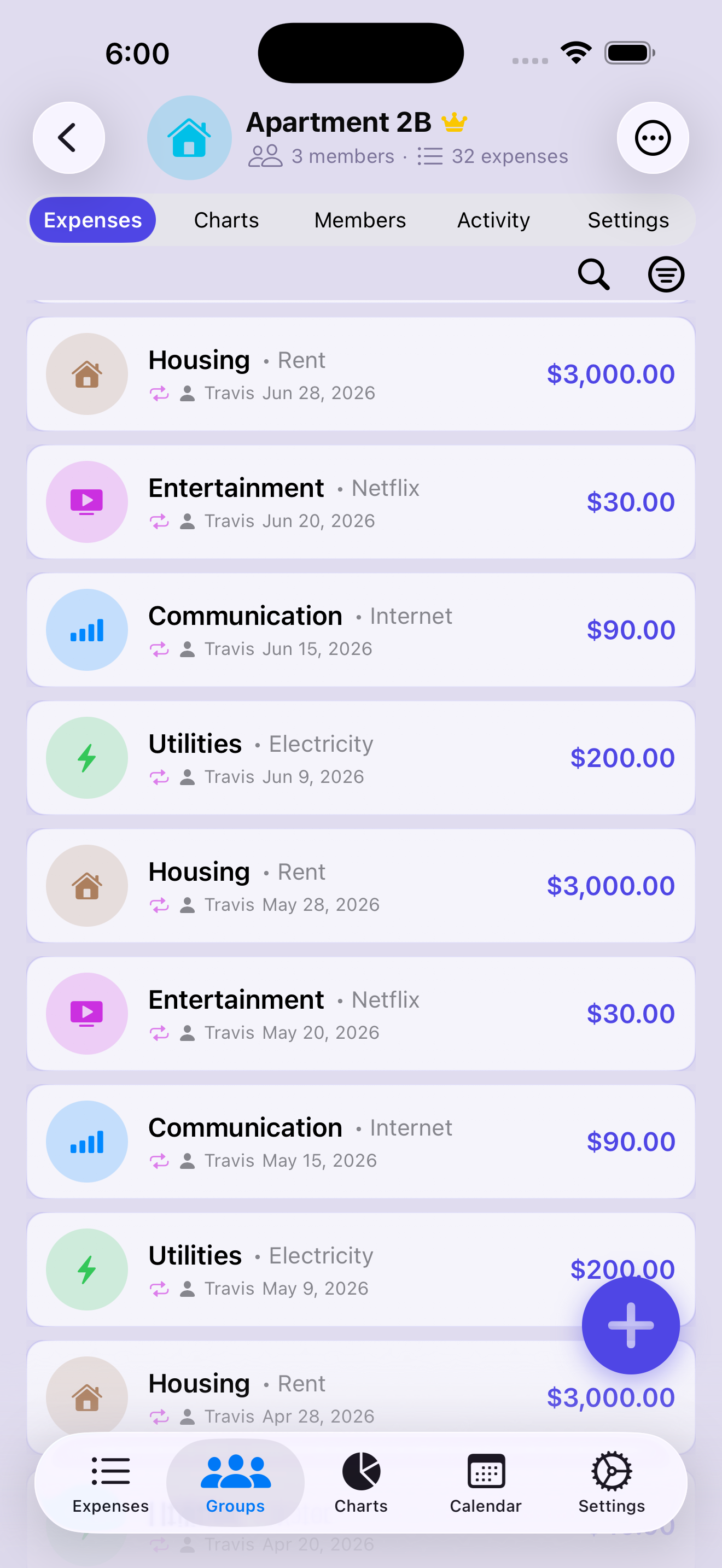
Apartment 2B expense list — rent, Netflix, internet and electricity repeating each month with recurring markers, from June back through April
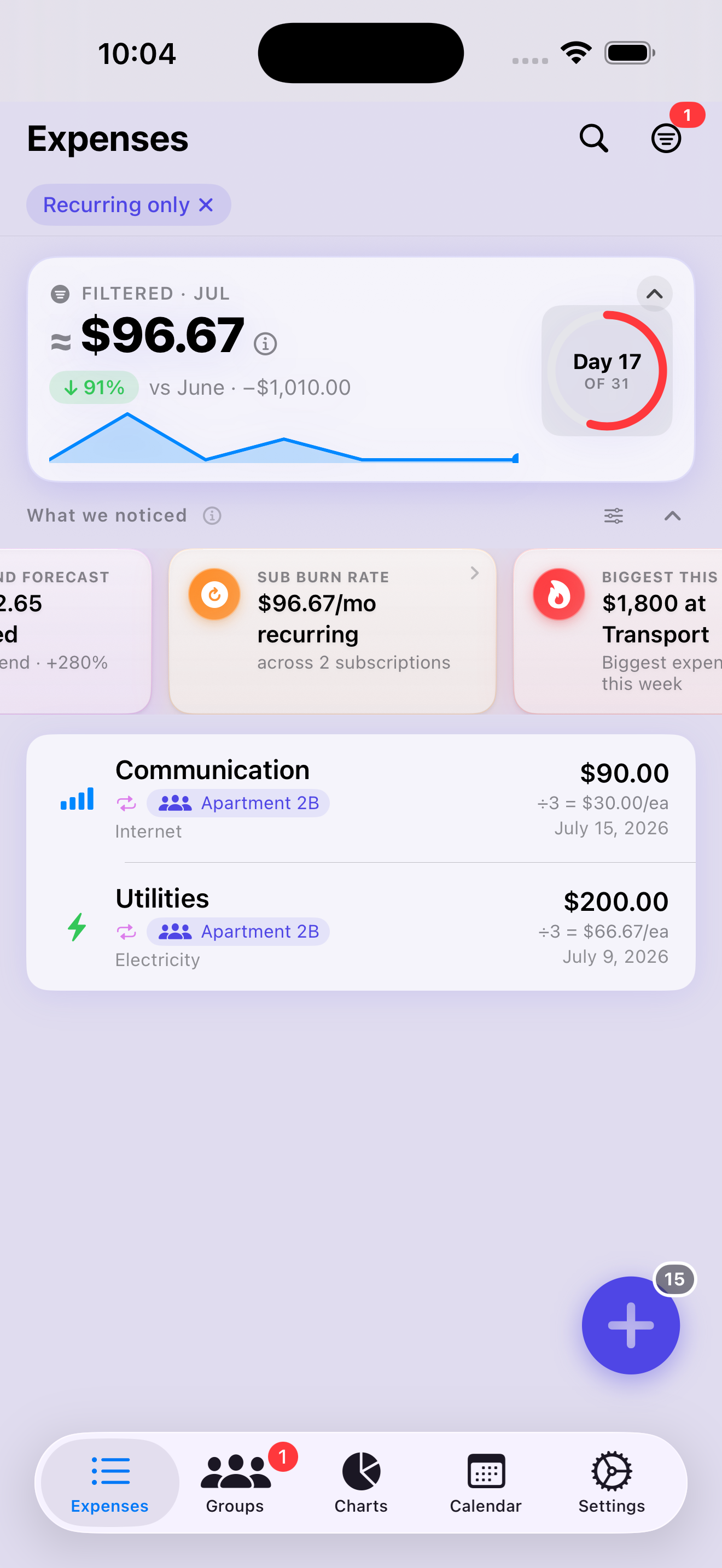
Sub Burn Rate insight card reading $96.67/mo recurring across 2 subscriptions, above the internet and electricity bills each showing this roommate's per-person share
Your subscription share

See what the recurring stuff is really costing you.

Streaming, internet, the gym you all share — subscriptions pile up quietly. The Sub Burn Rate card adds up every recurring charge so far this month and shows your slice of it, not the household total. Flip on the Recurring only filter in Search to see them all in one list.

  • Sub Burn Rate totals month-to-date recurring charges, split down to your share
  • Recurring only filter in Search lists every subscription — this month, 7, 30, 90 days, or all time
  • Spot a subscription nobody uses anymore before it renews again
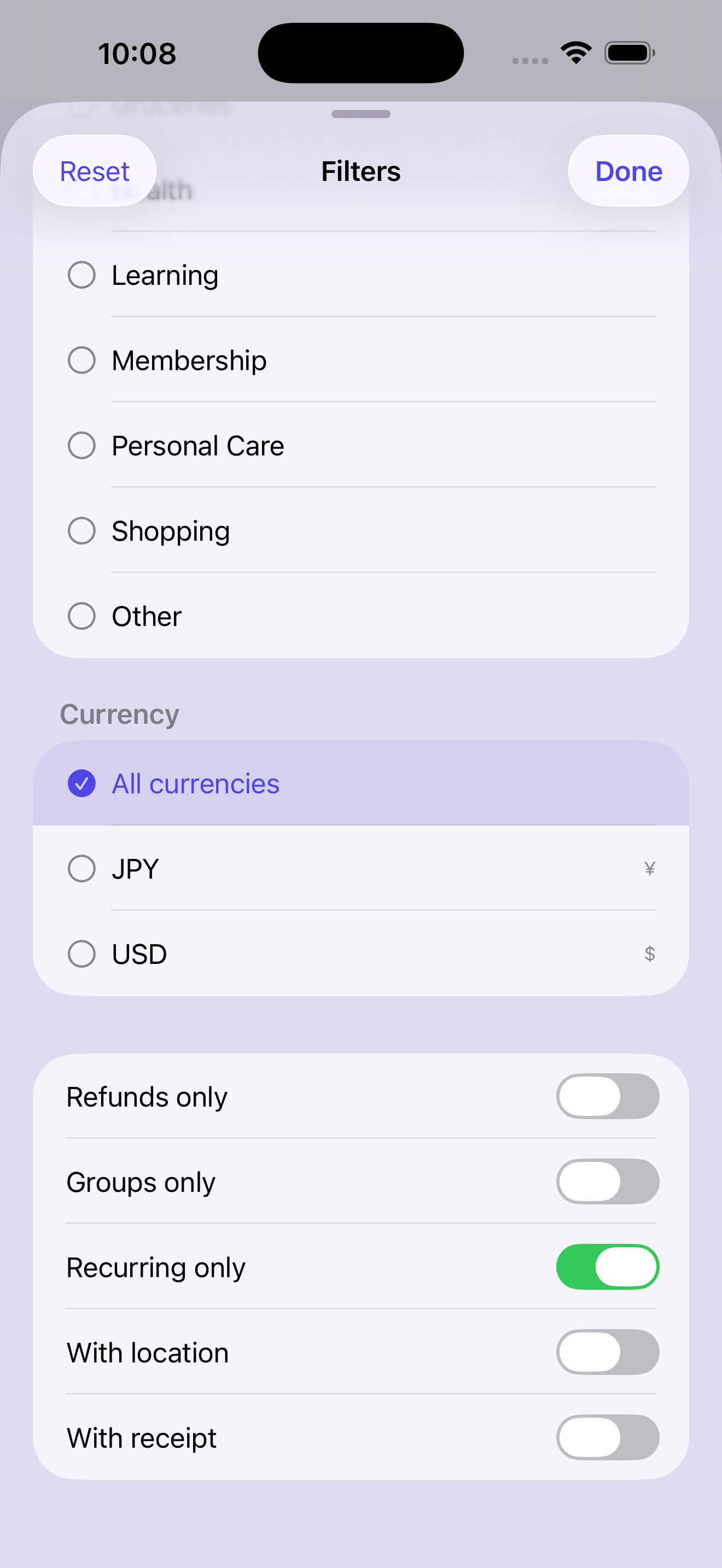
Search filters sheet with the Recurring only toggle switched on, so the expense list shows subscriptions only
Uneven splits

Bigger room? Bigger share.

Rent is almost never a clean three-way split. Whoever took the master bedroom pays more, the box room pays less — set each person's percentage once and the numbers stop being a monthly argument.

  • Any ratio you agreed on — 50/20/30, or whatever your lease works out to
  • A live total confirms the moment the percentages reach 100%
  • Exclude a roommate from any single bill — the rest absorb it automatically
  • No sign-up for roommates — add anyone to a bill, even without the app
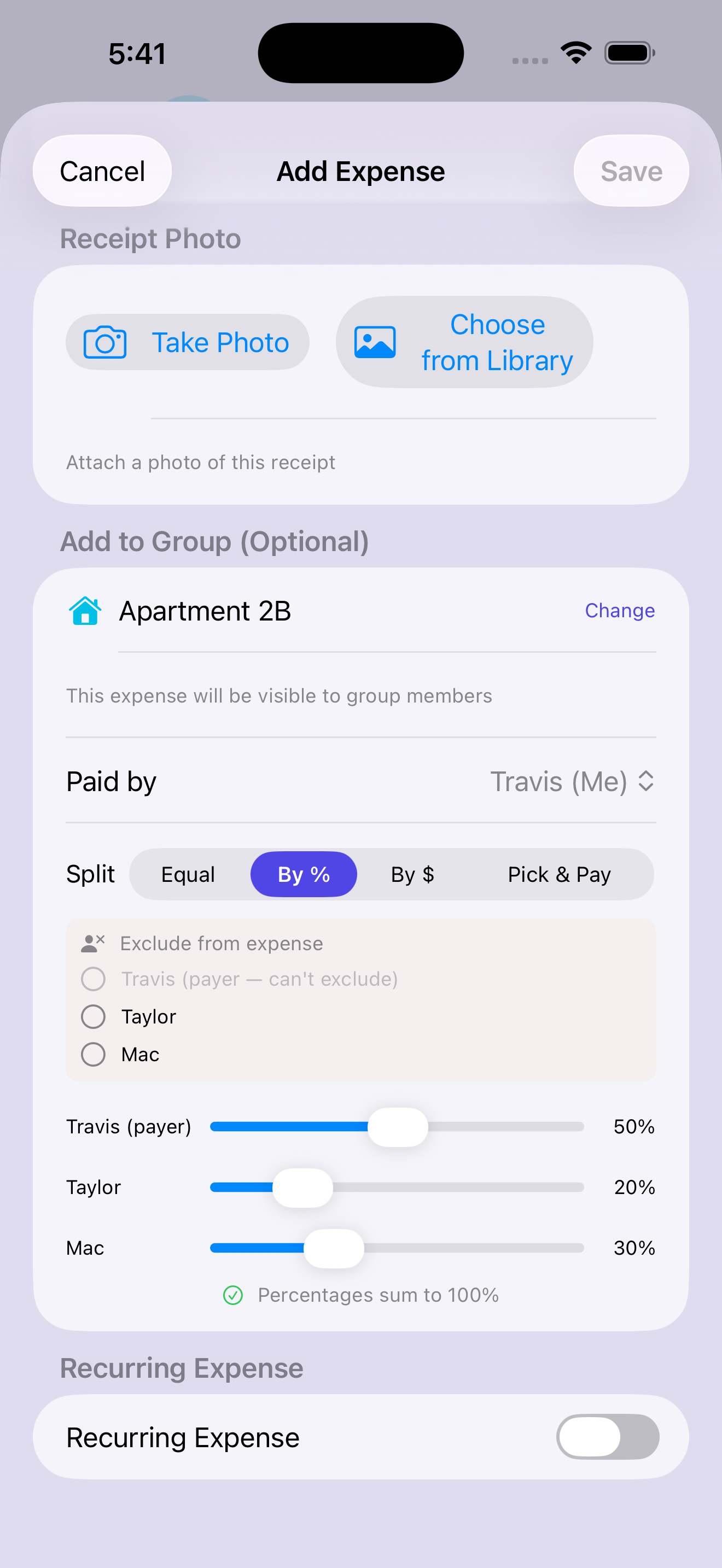
Add Expense for Apartment 2B — rent split by percentage between three roommates: Travis 50%, Taylor 20%, Mac 30%, totalling 100%
Household budgets

Know where the rent money goes.

See the whole household's month at a glance — what's gone to housing, utilities, food and everything else, each tracked against the budget you set together. No surprises when the bills land.

  • Spending broken down by category, month or year
  • A budget bar per category — see you're at 76% of housing before month-end
  • Charts reflect your share of the group's expenses, not just the raw total
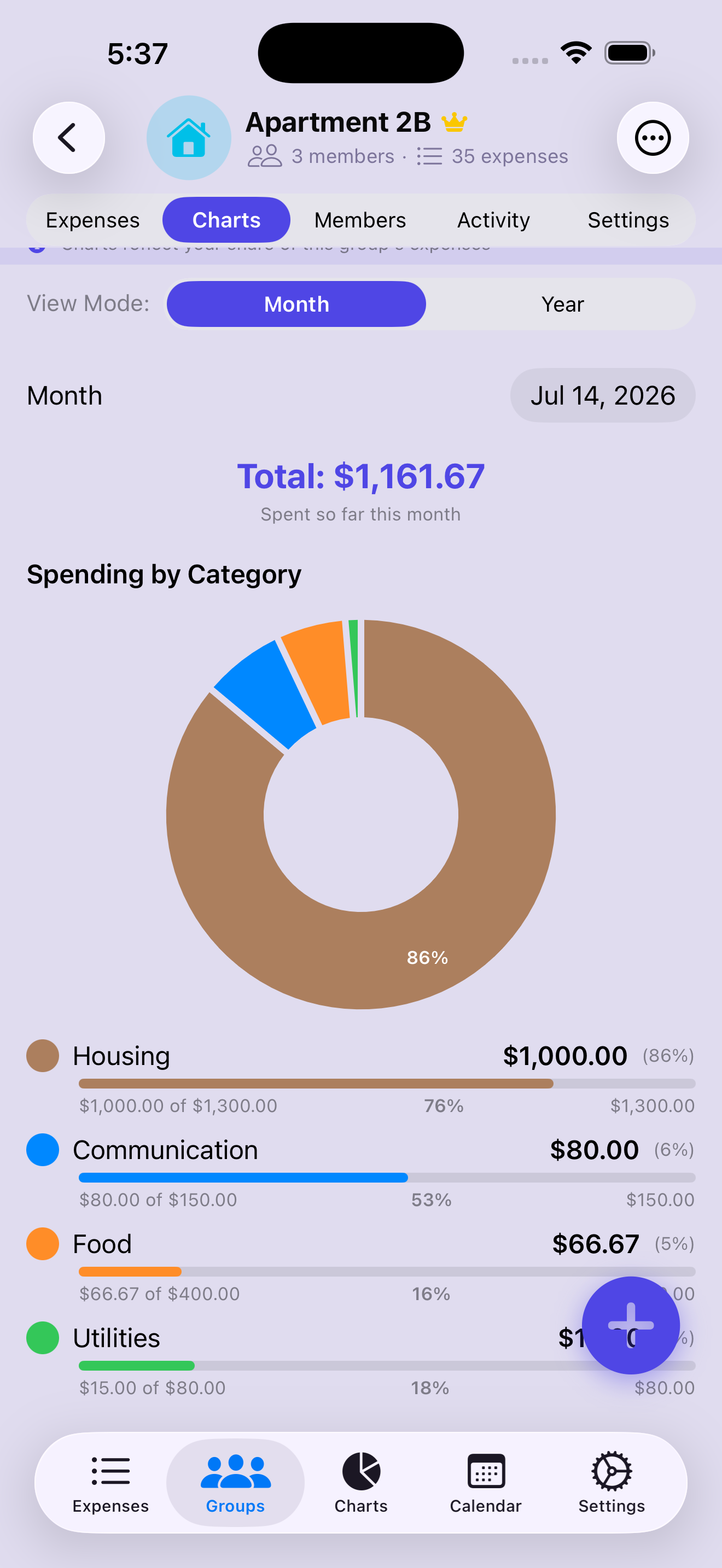
Charts tab for Apartment 2B — a spending-by-category donut with Housing at 86%, and budget progress bars for Housing, Communication, Food and Utilities
Balances & settle-up

Nobody has to ask who owes what.

The running balance is right at the top of the group — who's up, who's down, and by how much. When it's time to square up, smart settle-up nets the whole household down to the fewest payments possible.

  • A running balance per roommate — tap any card to see the detail
  • Smart settle-up nets everyone down to the fewest payments possible
  • Owed money? The reminder bell nudges them instead of you having to
  • Real-time sync — everyone sees new bills the moment they're added
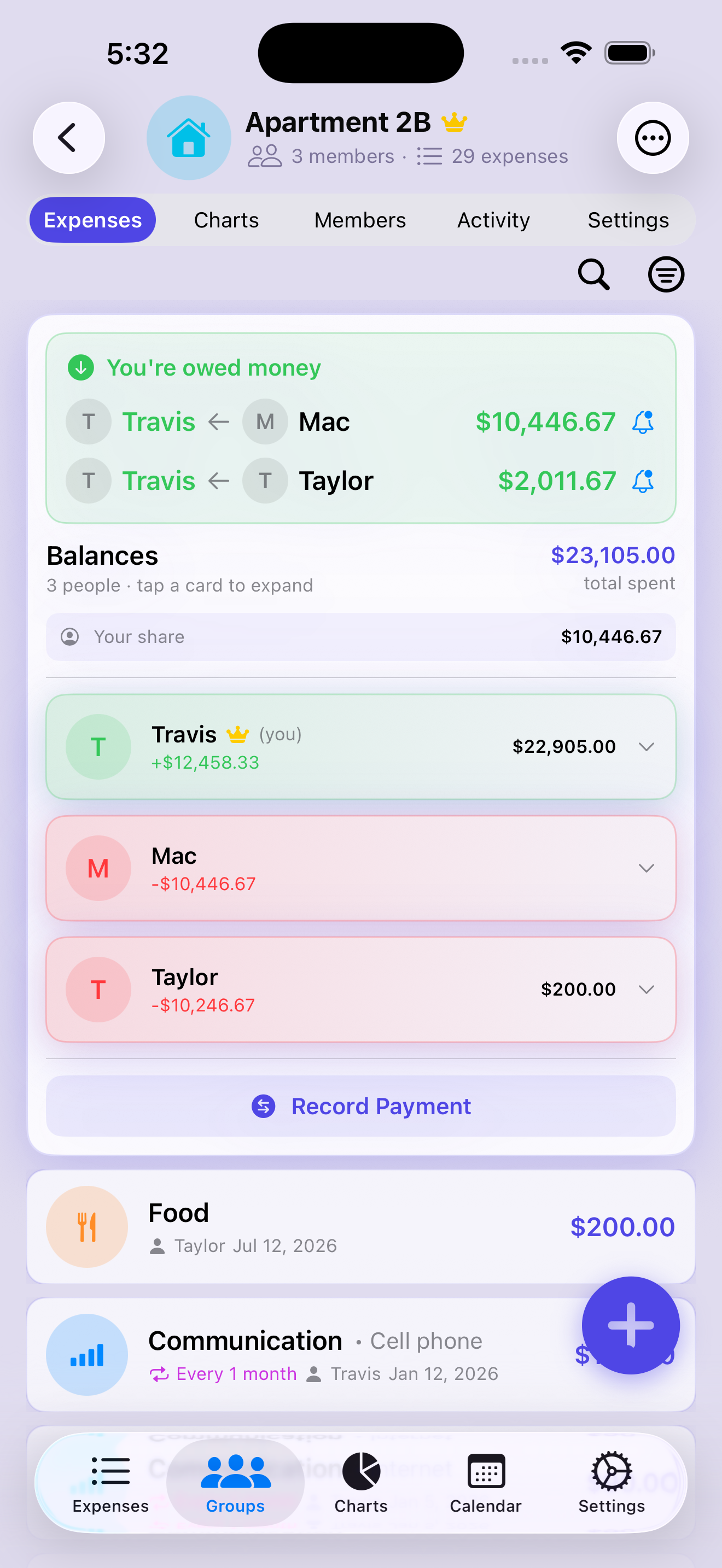
Apartment 2B group screen — who owes money with reminder bells, running balances for three roommates, and an expense list showing a recurring monthly cell phone bill
See all features
How it compares

Split smarter — and keep it private.

The things people actually switch for, side by side.

Node Expense Splitwise Tricount Settle Up
Scan a receipt and split it line by line
Import a saved photo, not just the live cameraCamera only
Split a single item by quantity (one beer, not the round)
Your receipts are never used to train AI models 1May train
Settle up via Venmo, Cash App & PayPalVenmo/PayPal
Smart debt simplification
Record a refund on any expenseWeb only
Personal spending tracker — solo, on-device
No phone, email, or sign-up required
Pay once for life — no subscriptionFree
  1. Per Splitwise's privacy policy, a third-party OCR vendor “may … train an algorithm on receipts you provide.” Node's personal scans stay on-device; group scans use Google's paid Gemini API, which is not used to train Google's models.
  2. Comparison based on each app's publicly available App Store description and privacy policy as of July 5, 2026; features may change over time.
  3. Node Expense is an iPhone, iPad & Mac app. Splitwise, Tricount, and Settle Up are trademarks of their respective owners and are not affiliated with or endorsers of Node Expense.

Private by design.

Solo budgeting stays strictly on your device — no account, no sign-up, and we never link to your bank or sell your data. Shared household bills sync securely so everyone stays in sync, and your backups are encrypted with a key stored securely in your iCloud Keychain.

No sign-up required No bank logins Personal data on-device Secure group sync Encrypted backups

Ready to stop chasing rent by text?

Download on theApp Store