
Travel together. Split expenses effortlessly.

Everyone pays in a different currency, and nobody remembers who covered what. Node Expense keeps it straight — fair splits, settled before you're home.

Download on theApp Store
Free to start  ·  No sign-up required  ·  iPhone, iPad & Mac
Also perfect for Roommates Couples
QR code to download Node Expense on the App Store Scan to download on iPhone
🏖️ Beach ⛰️ Mountains 🚗 Road trip ☕ Café

Wherever you're headed — we'll handle the expenses.

Built for splitting
✈️ Flights 🏨 Hotels 🚕 Transportation ⛽ Gas 🍔 Food 🎟️ Activities
AI itemizes every receipt, in any currency No sign-up needed for friends Smart settle-up — fewest payments possible Multi-currency tracking, built in
No subscription required — pay once, yours for life

Free plan: up to 15 personal expenses a month, no ads. Go PRO for unlimited.

Multi-currency balances

Yen here, dollars there — one clear picture.

A trip rarely runs in one currency. Node Expense keeps every currency's balance exact — no forced conversion — while still showing your approximate net across all of them, so you always know roughly where you stand.

  • Balances shown separately in every currency spent — JPY and USD side by side
  • An approximate net combines them into one number, using the day's rate
  • Settle-ups always happen in the original currency — no rounding surprises
  • A reminder bell nudges anyone who still owes you
Japan trip group screen — balances shown separately in JPY and USD, with an approximate net and reminder bells
Trip report

The whole trip, laid out clean.

When you're back, export the whole group's expense report in one tap — every expense itemized, balances broken out by currency, and suggested settle-ups spelled out. Review it together on the bigger screen; it looks just as sharp on iPad as it does on your phone.

  • Every expense itemized — date, category, who paid, and each person's share
  • Member balances and suggested settle-ups, broken out by currency
  • Looks just as sharp on iPad as iPhone — great for reviewing the trip together
Japan Group Expense Report on iPad — member balances by currency, suggested settle-ups, and an itemized expense list
Exclude anyone

Didn't go? Don't pay for it.

Taylor skipped the Tokyo Tower observation deck, so she's excluded from just that expense — the cost splits between whoever actually went, no manual math required.

  • Exclude anyone from a single expense, even if they're in the group
  • The remaining active members automatically split the full cost
  • Works with any split mode — equal, percentage, exact amount, or Pick & Pay
Add Expense screen for Tokyo Tower observation deck — Taylor excluded, cost split equally between the two remaining members
Spending map

See where the trip money went.

Every expense with a location becomes a pin on the map — bigger where you spent more, colored by category. Tap a pin to see what you bought there.

  • Name any place yourself — “Tokyo Tower” instead of “4‑2‑8 Shibakoen”
  • Charts → Top Locations ranks your places — search by name or address, show your top 10 or all of them, and tap one to see everything you spent there
  • Filter by category and time range — say, just the food from the last 7 days
  • Group expenses count your share, not the whole bill
  • Location is off until you turn it on in Settings
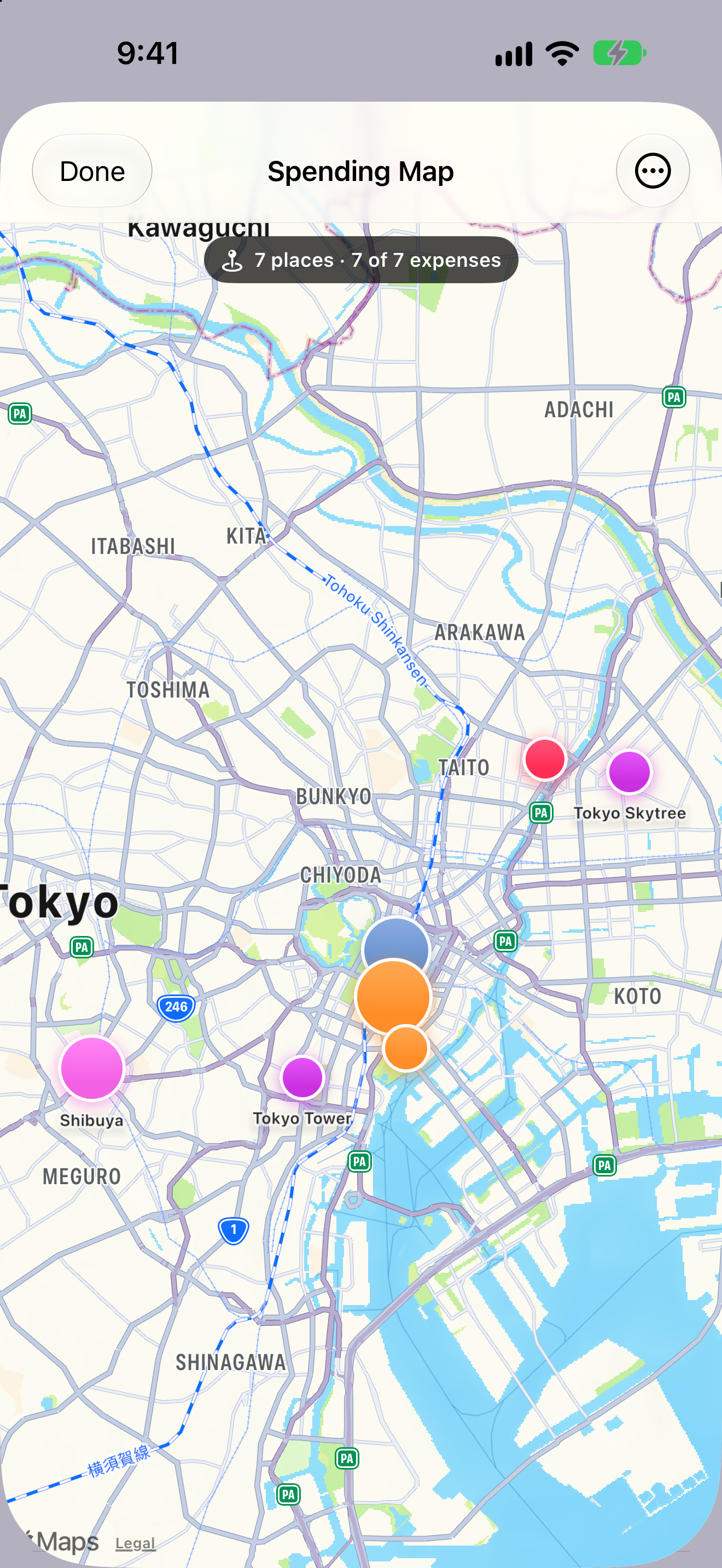
Spending Map of Tokyo — pins at Shibuya, Tokyo Tower, Senso-ji Temple, Tokyo Skytree, Ginza, Tokyo Station and Tsukiji, each sized by the amount spent and colored by category
Log it later

No need to log it on the spot.

Enjoy the moment and catch up that night at the hotel — or once you're back home. Set the day you spent it, type the place's name or its address, and Node Expense looks it up and puts the pin in the right place on the map.

  • Type a landmark like Tokyo Tower, or a street address, and it finds the spot — you don't have to be there
  • Shows the address it matched, so you can check it's the right place
  • Back-date each expense to the day it happened
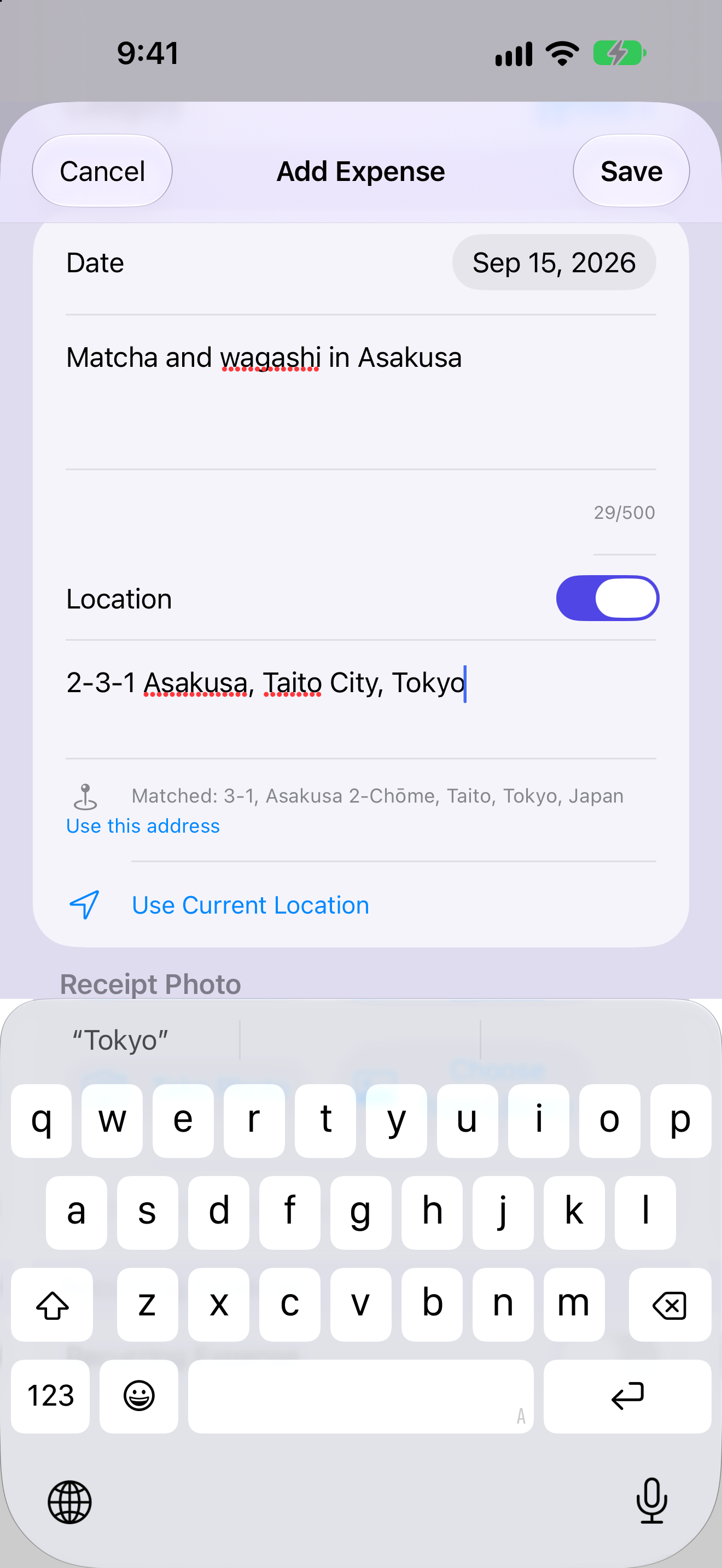
Add Expense screen dated September 15 — the typed address 2-3-1 Asakusa, Taito City, Tokyo, with the matched address shown below it
See all features
How it compares

Split smarter — and keep it private.

The things people actually switch for, side by side.

Node Expense Splitwise Tricount Settle Up
Scan a receipt and split it line by line✓✓——
Import a saved photo, not just the live camera✓✓——
Split a single item by quantity (one beer, not the round)✓———
Your receipts are never used to train AI models 1✓May train——
Settle up via Venmo, Cash App, PayPal, Apple Cash, Zelle, LINE & WeChat✓Venmo/PayPal——
Smart debt simplification✓✓—✓
Record a refund on any expense✓Web only——
Personal spending tracker — solo, on-device✓———
No phone, email, or sign-up required✓—✓—
Pay once for life — no subscription✓—Free—
  1. Per Splitwise's privacy policy, a third-party OCR vendor “may … train an algorithm on receipts you provide.” Node's personal scans stay on-device; group scans use Google's paid Gemini API, which is not used to train Google's models.
  2. Comparison based on each app's publicly available App Store description and privacy policy as of July 5, 2026, with the receipt-scanning rows re-checked November 6, 2026; features may change over time.
  3. Node Expense is an iPhone, iPad & Mac app. Splitwise, Tricount, and Settle Up are trademarks of their respective owners and are not affiliated with or endorsers of Node Expense.

Private by design.

Solo budgeting stays strictly on your device — no account, no sign-up, and we never link to your bank or sell your data. Group trips and shared bills sync securely so everyone stays in sync, and your backups are encrypted with a key stored securely in your iCloud Keychain.

No sign-up required No bank logins Personal data on-device Secure group sync Encrypted backups

Ready to split the trip bill before you land?

Download on theApp Store